Settings and customization
Settings control your account, workspace context, repository properties, and diagram modeling surface.
Profile settings
Use Profile settings to update your personal account information. Depending on your organization’s sign-in setup, password settings may also be available. For identity provider compatibility details, see Enterprise SSO.
Workspace settings
Workspace settings control shared workspace metadata. Workspace admins can rename the current workspace here, and only workspace admins can open this section.
The workspace name controls the label shown in shared workspace surfaces such as the workspace switcher, and it remains separate from the company name captured in the company profile itself.
Feature flags
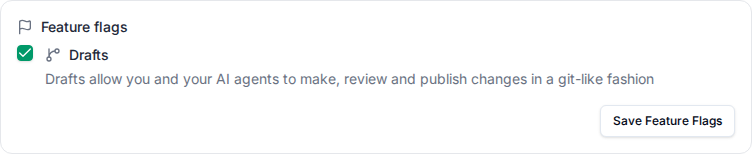
Workspace admins can turn optional features on or off under Settings > Feature flags.
- A flag applies to everyone in the workspace.
- Drafts is off by default. Turn it on to show the drafts chip in the top-right of the navigation bar. When it is off, that chip is hidden on the live workspace;
/draftsand editing still work. REST, MCP, and the database are unchanged.
Company profile
The company profile belongs to the workspace and is shared by the team.
The company profile can include the company website, industry context, operating countries, cloud provider, business functions, initiatives, and other high-level information.
This context helps teammates understand the workspace and helps the AI assistant produce more relevant drafts.
Website analysis and discovery
Caplo can use the company website to help populate company profile context. Review generated or discovered information before relying on it.
Website analysis and discovery are there to speed up setup, not replace judgment. Treat generated company profile content as a draft and verify it before teammates or AI-assisted workflows rely on it.
Workspace members
Workspace members shows who has access to the current workspace. Member management may be handled outside the app depending on your organization’s setup. For role and permission details, see Members and roles.
Workspace snapshots
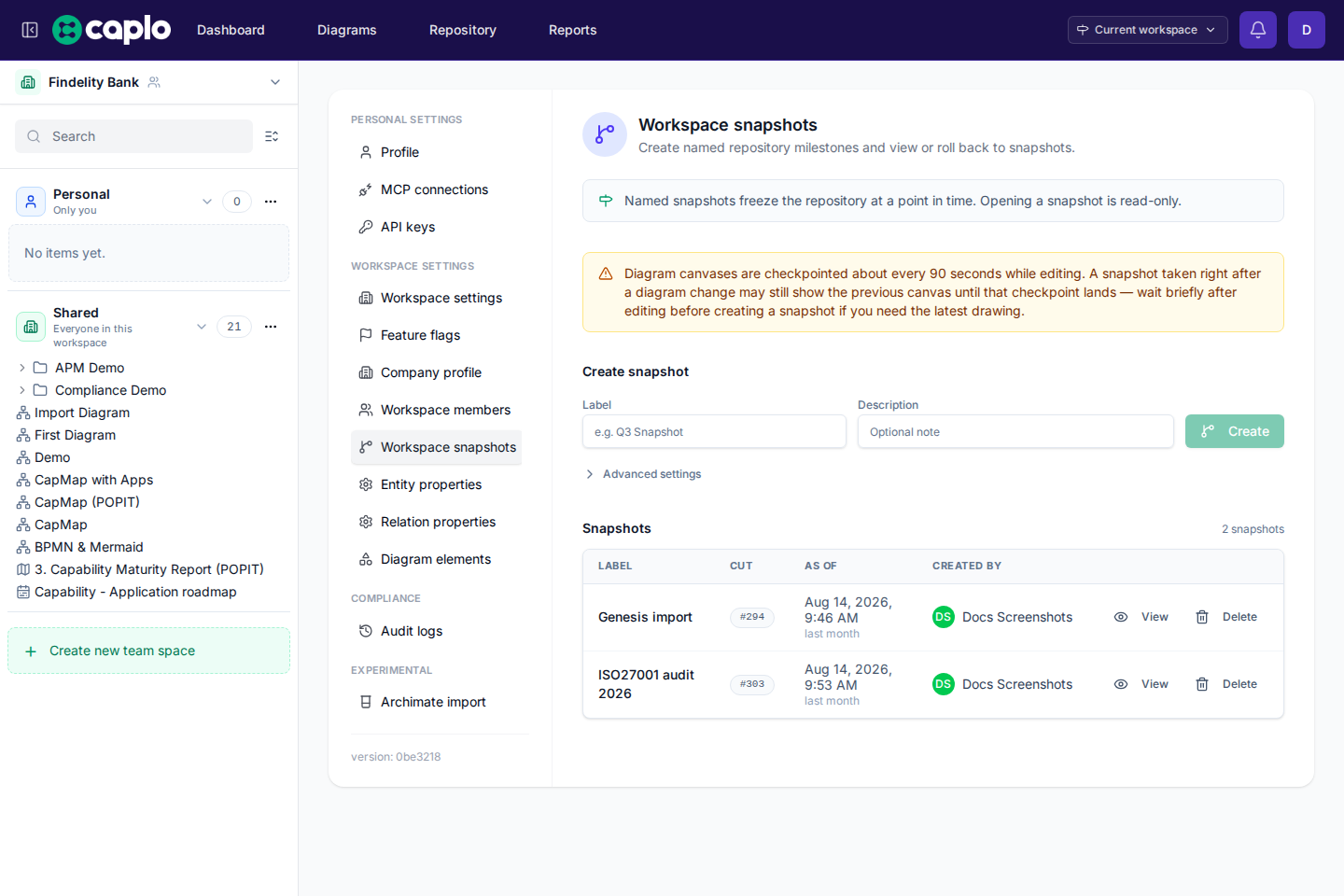
Open Settings > Workspace snapshots to create named versions of the whole workspace.
- Workspace admins can create a snapshot with a label and an optional description.
- Leave As of empty to snapshot the current workspace. Set a past time under Advanced settings if you need an earlier moment.
- View opens the workspace read-only as of that snapshot. A banner in the top navigation lets you switch snapshots or return to the live workspace.
- Deleting a snapshot removes it from the list. Per-item History stays.
History and snapshots explains per-item History and how that differs from viewing a snapshot.
MCP connections
Use Settings > MCP connections to review hosted MCP authorizations for external AI clients such as Cursor and Claude Code.
- Each authorization is bound to one workspace.
- To move a client to another workspace, revoke the authorization and reconnect.
- See MCP connections for the full browser-based setup flow.
API keys
Open Settings > API keys to create and revoke credentials for the public REST API.
- Keys authenticate against the active workspace.
- Optionally set an expiration when creating a key.
- Secrets are shown once at creation time.
- Keys can be revoked at any time.
- Interactive API docs are available at
/api/v1/docson your Caplo host.
Audit logs
Workspace admins can open Settings > Audit logs to review recent non-read mutations in the active workspace.
- The audit logs record creates, updates, deletes, and summarized live diagram edit sessions.
- Audit rows show the date, actor, action, resource name, and resource type; clickable resource names open the detailed page when one exists.
- Events older than the workspace retention period are automatically deleted by the scheduled database cleanup.
- Admins can export the currently filtered audit log view to CSV.
- Read-only browsing actions are not included.
- Audit visibility is limited to workspace admins for the current workspace.
Custom entity properties
Custom entity properties capture metadata for repository entities. Examples:
- Owner
- Lifecycle stage
- Annual cost
- Criticality
- Technology fit
- PACE category
- Retirement date
Create properties that support reporting, filtering, and decision-making.
Custom relation properties
Custom relation properties add metadata to relationships, such as data object, integration frequency, interface type, or confidence level.
Use relation properties when the attribute describes the connection itself, not either endpoint.
Property types
Choose a property type based on how the data will be used. Pick list-style properties for consistent filtering, numeric properties for charts and aggregation, date or Date or range properties for timelines, and text properties for short descriptive notes. Date or range stores an exact day or a year / quarter / month window.
Diagram element visibility
Element visibility settings let the workspace focus the diagram toolbar on the types your team uses. This keeps modeling simpler and prevents accidental use of element types that are outside your method.
A type stays enabled while it is in use: there is an approved live entity of that type, or an open draft still has a non-deleted entity of that type. You can turn a type off again after those entities are removed.